
The definition of a workspace has permanently transformed. Whether you are a university student juggling seminar notes and dissertation drafts, or a remote professional managing cross-continental meetings and heavy spreadsheets, your laptop is no longer just a gadget, it is your entire office.
A sluggish machine, a battery that dies two hours into a lecture, or a noisy fan that interrupts client calls can severely drain your daily productivity. Upgrading to a modern, fast, and dependable laptop is the single highest-impact investment you can make for your academic and professional life.
Finding top-tier hardware without breaking your budget requires timing and smart retailer selection. That is where Worten stands out. Renowned for extensive tech inventories across consumer electronics, Worten offers competitive technology promotions, robust post-purchase support, and buyer-friendly price guarantees.
Here is an in-depth buyer’s guide comparing ultra-portable MacBooks against versatile Windows productivity machines to help you secure the ideal device during Worten’s seasonal promotional campaigns.
The Big Debate: Apple MacBook vs. Windows Workhorses
The first major fork in the road when upgrading your home office setup is picking your operating system. Both Apple silicon and modern Intel/AMD Windows platforms offer compelling strengths depending on your daily workload.
The MacBook Advantage: Efficiency, Battery Endurance, and Build Quality
Apple’s transition to its proprietary silicon architecture revolutionized portable computing. For university students moving between lecture halls and remote professionals working out of coffee shops, modern MacBooks deliver a distinct set of operational advantages:
- Unmatched Battery Life: Apple Silicon processors sip power with incredible efficiency. Modern MacBook Air and Pro models regularly deliver 15 to 18 hours of real-world use on a single charge, allowing you to leave heavy power bricks at home.
- Whisper-Quiet Operation: The fanless design of the MacBook Air line means zero mechanical noise, even under demanding multitasking sessions.
- Hardware Longevity and Resale Value: Premium aluminum unibody chassis construction, class-leading glass trackpads, and long-term macOS security update lifecycles ensure MacBooks retain their performance and market value for years.
- Apple Ecosystem Synergy: If you already use an iPhone or iPad, features like Universal Clipboard, AirDrop, and Sidecar (using your iPad as a wireless second monitor) create a smooth, unified workflow.

The Windows Advantage: Flexibility, Portability Options, and Ecosystem Variety
Windows productivity laptops from brands like ASUS, Lenovo, HP, and Dell remain the backbone of corporate enterprise and specialized academia:
- Versatile Form Factors: Windows hardware covers everything from traditional ultra-slim clamshells to 2-in-1 convertibles with 360-degree hinges and active stylus support, making them ideal for handwritten digital notes.
- Broad Software Compatibility: Specialized engineering tools, data modeling packages, legacy corporate software, and gaming engines run natively on Windows with zero compatibility layers.
- Superior Port Selection: Unlike minimal dual-port designs, many Windows laptops include full-sized HDMI ports, multiple USB-A slots, and SD card readers built directly into the chassis.
- Granular Price-to-Spec Ratios: Windows laptops provide varied hardware configurations across memory, storage, and graphics options to match specific budget constraints.
Top Laptop Categories to Target on Worten
1. The Ultra-Portable Everyday Champ: Apple MacBook Air (M-Series)
- Best For: University students, freelance writers, digital nomads, and administrative pros.
The MacBook Air remains the gold standard for daily mobile productivity. Weighing just over one kilogram, it slips easily into any backpack while offering desktop-class computing speed for browser tabs, document drafting, 4K video playback, and basic photo editing. The Liquid Retina display features sharp text rendering that minimizes eye strain during late-night study sessions.
2. The Agile Multitasker: Lenovo Yoga & IdeaPad Series
- Best For: Hybrid workers, visual note-takers, and business analysts.
Lenovo has mastered ergonomic typing with responsive keyboards and smart 16:10 aspect ratio screens that show more rows on spreadsheets. The Yoga 2-in-1 convertible lineup lets you flip from typing an essay to annotating lecture slides with a stylus in seconds, offering complete flexibility for hybrid classrooms.
3. The Enterprise Workhorse: ASUS ZenBook & Vivobook Lines
- Best For: Creatives, content marketers, and remote team managers.
ASUS laptops frequently feature stunning OLED displays with rich color accuracy, deep contrast ratios, and low blue-light emission. If your work involves visual presentations, photo retouching, or media production, a ZenBook provides vibrant visuals paired with modern multi-core processors.
4. The High-Power Option: HP Pavilion & Envy Workstations
- Best For: Heavy data crunchers, developers, and power users.
When your daily tasks move beyond web browsing into local database management, video rendering, or running virtual machines, HP’s higher-spec Envy machines pack dedicated graphics cards, up to 32GB of RAM, and swift solid-state drives designed to power through demanding workloads without throttling.
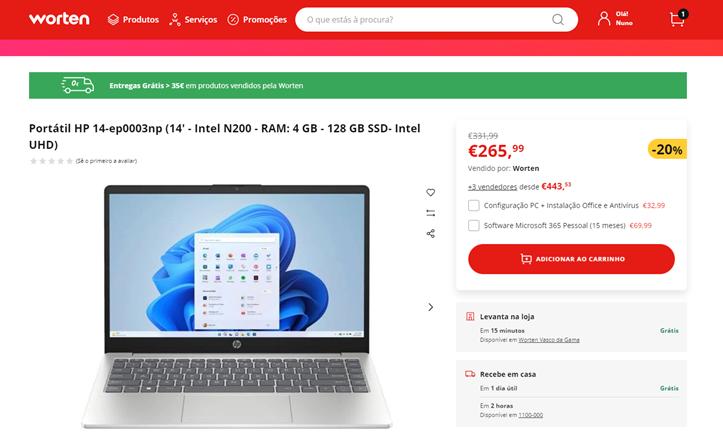
Maximizing Your Savings on Worten: Guarantees & Smart Timing
Upgrading your home office hardware does not require paying full retail prices. Worten offers several shopper-focused mechanisms that ensure you get maximum value for your purchase:
Worten Value Playbook
| Value Driver | What It Offers |
|---|---|
| Best Price Guarantee | Matches lower prices on identical retail products |
| Promo Windows | Seasonal savings during Back-to-School, Black Friday, and Tech Days |
| Student Savings | Dedicated discounts on academic hardware |
| Warranties & Care | Extended protection and trade-in options |
- The Worten Price-Match Guarantee: Worten monitors market prices to keep their hardware competitive. If you spot an identical, in-stock laptop model sold cheaper by an authorized local retailer, Worten’s price-match policy allows you to claim the lower price, giving you total peace of mind when checking out.
- Back-to-School Promotional Windows: The annual late-summer Back-to-School season is prime time for student laptop upgrades. During this promotional window, Worten rolls out substantial price cuts on laptops, student bundle deals (often pairing laptops with mice, laptop sleeves, or Microsoft 365 licenses), and zero-interest installment plans.
- Trade-In Opportunities: Worten regularly runs trade-in campaigns where bringing in your old, functional laptop or tablet unlocks direct voucher credits toward your new computer purchase.
- Seasonal Sales & Tech Weeks: Keep a close eye on Worten’s seasonal Flash Sales and Tech Days throughout the calendar year, which frequently apply direct instant discounts on premium brands like Apple, Lenovo, HP, and ASUS.
Essential Home Office Accessories to Complete Your Setup
A high-performance laptop is the central engine of your desk, but pairing it with the right ergonomic peripherals prevents physical fatigue and maximizes daily output:
- An External Display: Connecting your laptop to a 27-inch 4K or QHD monitor doubles your visual workspace, allowing you to reference documents on one screen while writing on the other.
- Ergonomic Wireless Peripherals: Upgrading to a comfortable mechanical or low-profile keyboard and an ergonomic vertical mouse protects your wrists during extended working hours.
- USB-C Multiport Hub: If you choose a sleek ultra-thin laptop with limited connectivity, a dedicated USB-C hub instantly expands your workstation to support HDMI, Ethernet cables, memory cards, and multiple USB accessories through a single cable.
- Adjustable Laptop Stand: Elevating your laptop screen to eye level improves your posture and improves underside airflow to keep your machine running cool.
FAQs Zone
How much RAM do I really need for home office work and university study?
For basic tasks like web browsing, document writing, and watching lectures, 8GB of unified RAM on modern MacBooks or 16GB on Windows laptops provides smooth everyday performance. If your daily routine involves running dozens of browser tabs simultaneously alongside complex spreadsheets, local coding environments, or design software, choosing a 16GB or 32GB configuration will ensure future-proof stability.
Can a lightweight MacBook Air handle light gaming during study breaks?
Yes! Apple Silicon chips feature capable integrated graphics that run casual titles, indie games, and native macOS ports smoothly. However, if your primary hobby is competitive PC gaming, AAA titles, or modded simulation games, a dedicated Windows machine with a discrete graphics card remains the superior platform.
Is it safe to leave my modern laptop plugged into the wall all day?
Yes. Modern laptop operating systems utilize smart battery management algorithms that slow down charging once they reach 80% to preserve lithium-ion battery health. You do not need to constantly unplug your machine while working at your desk.
Should I prioritize a faster processor or more internal storage?
Prioritize memory and processor power first! Internal RAM and processors are permanently soldered into modern ultra-thin laptops and cannot be upgraded later. If your internal SSD storage fills up down the road, you can easily connect affordable external SSDs or rely on cloud storage solutions to archive your larger files.