“This article contains affiliate links. If you choose to purchase through them, we may earn a commission at no additional cost to you. We only recommend tools that provide real value to homeowners and renovators.”
Why Most First-Time Renovators Get Overwhelmed
Renovating your home sounds exciting until you start making layout decisions.
Where should the walls move?
Will the kitchen island actually fit?
How much walking space do you need around a bed?
What will it look like when everything comes together?
These are the questions that derail most first-time renovators.
The problem isn’t creativity. It’s visualization.
Without a structured way to test ideas, people rely on rough sketches, contractor explanations, or imagination. That often leads to costly revisions, miscommunication, and regret.
The solution is surprisingly simple: design before you build.
And you don’t need architectural training to do it.
Step 1: Start With Measurements, Not Pinterest
Before you open any design tool, gather:
Room dimensions
Ceiling height
Window and door placements
Fixed elements like plumbing or load-bearing walls
Accuracy at this stage prevents expensive mistakes later.
Many beginners skip this step because it feels technical. But here’s the truth:
The fastest way to ruin a renovation is guessing dimensions.
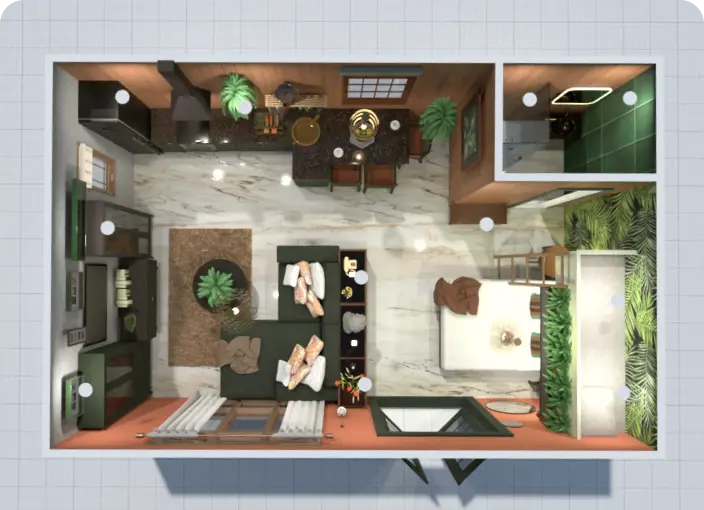
Once you have measurements, you can begin building a digital floor plan. This is where a beginner-friendly platform like Planner 5D becomes useful. Instead of wrestling with complex CAD software, you can drag walls into place using exact dimensions and instantly see your space take shape.
Why Digital Floor Planning Changes Everything
You can:
- Adjust wall lengths precisely
- Test different room layouts in minutes
- Avoid spatial miscalculations
- Share plans easily with contractors
Seeing your layout mapped accurately gives you confidence before spending a single dollar on construction.
Step 2: Switch From 2D Thinking to 3D Visualization
A flat blueprint doesn’t always reveal how a space feels.
Will the living room feel cramped?
Is the kitchen triangle efficient?
Does the bedroom placement block natural light?
This is where beginners typically struggle.
One advantage of tools like Planner 5D is the ability to toggle between 2D and 3D views in real time. That means you don’t just see measurements. You see perspective.
You can virtually “walk through” your space and catch problems early.
This one feature alone can prevent layout regret.

For first-time renovators, this removes guesswork. And removing guesswork removes stress.
Step 3: Test Furniture Before Buying It
Impulse purchases are renovation budget killers.
That sectional sofa might look perfect online. But will it dominate the room?
Is there enough clearance behind dining chairs?
Can you open cabinets fully?
Instead of guessing, you can place virtual furniture inside your digital layout.
Most beginner platforms offer object libraries with:
Sofas
Tables
Beds
Cabinetry
Lighting fixtures
Decor elements
Planner 5D includes an extensive catalog where you can drag and drop items into your plan and resize them to scale. This makes it easier to experiment with different configurations without moving a single physical object.

This approach transforms renovation from risky decision-making into controlled experimentation.
Step 4: Think in Functional Zones
First-time renovators often focus too heavily on aesthetics. Paint colors. Finishes. Cabinet handles.
But layout success depends on function.
Before finalizing your design, ask:
How does traffic flow through the space?
Where are the natural conversation areas?
Is there enough clearance around high-use areas?
Are noisy rooms separated from quiet ones?
A digital planning tool helps you analyze these zones visually.
You can test:
Open concept vs semi-open
Island vs peninsula kitchen layouts
Walk-in closet vs built-in storage
Desk placement relative to windows
Most homeowners don’t realize how easy it is to experiment digitally.
That experimentation phase is what separates rushed renovations from strategic ones.
Step 5: Collaborate Before Construction Begins
Communication gaps cause budget overruns.
When contractors interpret vague sketches or verbal descriptions, assumptions creep in. Digital plans reduce ambiguity.
With a platform like Planner 5D, you can:
Export plans
Share visual previews
Align expectations visually
Make changes before contracts are finalized
This step alone can reduce friction between homeowner and contractor.
Clear visuals lead to confident decisions.
Common Beginner Mistakes You Can Avoid
Instead of learning the hard way, watch for these pitfalls:
- Designing for aesthetics before functionality
- Ignoring realistic furniture scale
- Forgetting clearance requirements
- Overestimating storage space
- Making layout decisions without 3D visualization
Every one of these mistakes becomes obvious when you model your space first.
That’s the core advantage of using a visual planning platform early in the process.
Why Simplicity Matters for First-Time Designers
There are professional-grade design programs on the market.
They’re powerful.
They’re complex.
They require training.
For a homeowner managing their first renovation, complexity creates friction.
Tools like Planner 5D sit in a practical middle ground. They’re intuitive enough for beginners but structured enough to produce accurate layouts.
You don’t need to understand architectural drafting standards.
You don’t need to memorize commands.
You don’t need advanced technical skills.
You need clarity.
And clarity comes from visual planning.
A Practical Workflow You Can Follow Today
Here’s a simple sequence to get started:
Measure your space precisely
Build the floor plan digitally
Switch to 3D mode and evaluate proportions
Test multiple furniture layouts
Review functional flow
Share visuals with stakeholders
This workflow transforms renovation from reactive to strategic.
The difference between chaos and confidence is planning.
Final Thoughts: Design Before You Demolish
Renovation regret usually comes from rushed decisions.
When walls move, plumbing shifts, or cabinets are installed, changes become expensive.
Digital design tools allow you to experiment freely before committing financially.
You don’t need to become an architect.
You don’t need expensive drafting software.
You need a visual system that supports smart decision-making.
For first-time renovators who want control without complexity, Planner 5D provides a practical starting point that balances accessibility with real planning power.