







“This article contains affiliate links. If you purchase through them, we may earn a commission at no extra cost to you. We only recommend tools we believe deliver real creative value.”
Most DIY interior designers start with mood boards.
Pinterest collections.
Instagram saves.
Screenshots of dream kitchens.
But there’s a gap between inspiration and execution.
The difference between amateur and professional-level results often comes down to one thing:
If you’ve already experimented with room planners and want to move beyond basic layouts, this guide breaks down the advanced capabilities that separate serious design tools from simple sketch apps.
And yes, some platforms — including Planner 5D — now offer features that were once reserved for professional software.
Let’s break down what actually matters.
Real-Time 2D to 3D Switching: The Foundation of Spatial Mastery
Most beginners design in 2D.
Professionals think in 3D.
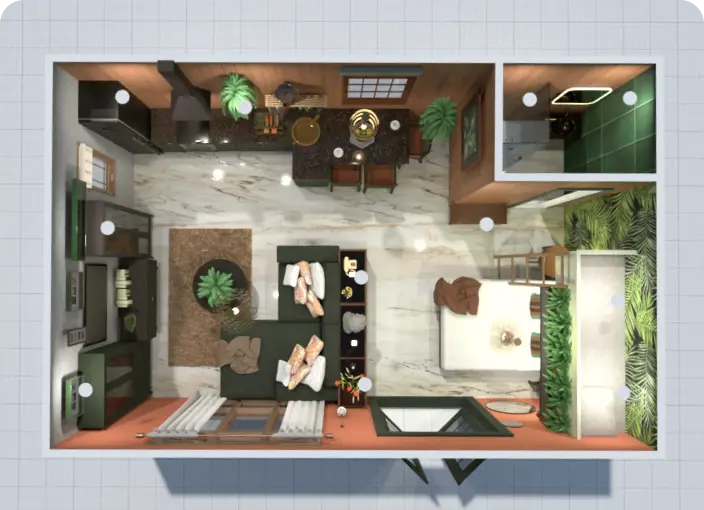
The ability to switch instantly between technical floor plan view and immersive 3D walkthrough is more than convenience. It changes how you evaluate space.
With advanced room planners like Planner 5D, you can:
Adjust walls in 2D precision mode
Immediately visualize height, depth, and proportion in 3D
Identify awkward sight lines
Test ceiling height perception
This instantly reveals layout flaws you’d otherwise miss.
It’s where DIY projects start looking professionally considered.

For hobbyists ready to level up, this is non-negotiable.
High-Quality Rendering: From Concept to Portfolio-Worthy Visuals
Here’s where things get interesting.
Basic design tools show rough previews.
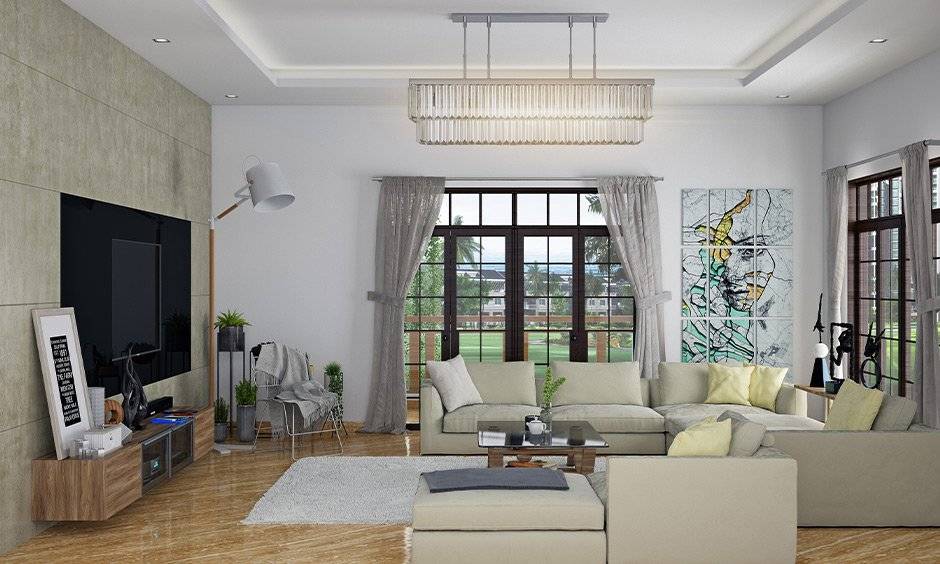
Advanced tools produce photorealistic renders.
Lighting shadows.
Material reflections.
Realistic textures.
Natural light direction.
High-quality rendering changes how your design is perceived.
It turns mockups into presentation-ready visuals.
Premium rendering options inside Planner 5D allow users to generate realistic scenes that feel close to architectural visualization outputs. For DIY creators building portfolios, sharing ideas with clients, or even just showcasing projects online, this feature matters.


Lighting simulation especially separates casual tools from serious platforms.
Extensive Object Library With Customization Controls
Dragging generic sofas into a plan is fine.
Customizing materials, colors, finishes, and dimensions is better.
An advanced design workflow requires flexibility.
Within Planner 5D, users gain access to:
Expanded furniture libraries
Surface material swaps
Texture customization
Object resizing with proportional accuracy
Decor layering
This is where creative control explodes.
Small adjustments create big design impact.
Instead of settling for “close enough,” you can fine-tune aesthetic decisions until they feel intentional.
For hobbyists serious about craft, control equals credibility.
AI-Assisted Design Suggestions
Artificial intelligence in design tools isn’t about replacing creativity.
It’s about accelerating it.
AI assistance inside Planner 5D can:
Auto-generate room layouts
Suggest furniture arrangements
Optimize space usage
Provide style direction prompts
This dramatically reduces creative block.
It speeds up iteration without sacrificing originality.
For DIY designers who work solo, this becomes a silent collaborator.
Instead of staring at a blank layout, you refine suggestions into something uniquely yours.
Multi-Platform Sync for Flexible Workflow
Serious hobbyists design everywhere.
Laptop at night.
Tablet on the couch.
Phone during inspiration moments.
Cross-platform synchronization ensures your projects move with you.
With Planner 5D, designs created on desktop can be accessed on mobile and vice versa. That flexibility keeps momentum alive.
And momentum is everything in creative projects.
Creative flow shouldn’t be device-dependent.
Exporting and Sharing: From Hobby to Opportunity
Advanced users eventually want to share work.
Whether you’re:
Building a small freelance portfolio
Pitching renovation ideas
Sharing before-and-after visuals
Collaborating with contractors
Export functionality matters.
High-resolution exports, shareable project links, and visual previews elevate your presentation standard.
When your visuals look professional, you’re treated like a professional.
That’s not hype. It’s perception psychology.
Performance vs Professional CAD Tools
Let’s address the comparison.
Professional CAD platforms like AutoCAD or SketchUp are powerful. But they require steep learning curves and technical drafting knowledge.
For DIY hobbyists, the question isn’t maximum capability.
It’s practical capability.
Planner 5D sits in a strategic middle ground:
Advanced enough for serious visual planning
Accessible enough to use without training
Affordable compared to pro-level software
That balance is what makes it compelling for experienced DIY designers who want more than basic drag-and-drop tools but less than full architectural systems.
When Should You Upgrade to Premium?
If you:
Care about photorealistic rendering
Want expanded object libraries
Need advanced customization controls
Are building a design portfolio
Plan to collaborate visually with others
Then upgrading from free to premium features often makes sense.
This is where hobby design turns into serious creative work.
But if you’re just sketching rough room ideas occasionally, the free tier may be enough.
Choosing based on usage intensity keeps the investment rational.
The Creative Ceiling Is Higher Than You Think
DIY interior design has evolved.
The tools available today blur the line between amateur and professional.
With advanced features like:
Real-time 2D to 3D switching
Photorealistic rendering
AI-assisted layouts
Extensive customization libraries
Cross-platform syncing
Platforms like Planner 5D give hobbyists capabilities that once required expensive design suites.
The only real limit becomes your creativity.
And when your tools remove friction instead of adding it, creativity expands.
If you’ve mastered basic layout tools and want your projects to look polished, intentional, and presentation-ready, exploring advanced features is the logical next step.
Design is no longer gated by formal training.
It’s enabled by accessible technology.