Creating a productive workspace does not require buying every device brand-new. Back Market home office tech offers an alternative for people who want to compare refurbished laptops, monitors, and other electronics while managing their setup costs. For remote workers, freelancers, and students in Spain, choosing the right refurbished equipment can make a home office more practical without stretching the budget.
The key is to spend on the technology that supports your daily tasks and avoid paying extra for features you may never use.
Start with the Devices That Matter Most
A useful home office setup begins with a reliable computer. If your work involves documents, video meetings, spreadsheets, or browser-based tools, a refurbished laptop may cover most everyday needs. People working with large datasets, design software, or demanding applications should pay closer attention to processor performance, RAM, and storage before choosing a model.
Back Market home office tech listings can help shoppers compare available devices and specifications. However, a lower price does not automatically mean better value. Check the model’s age, condition, operating-system compatibility, and the total cost before making a decision.
Which Refurbished Tech Is Worth Considering?
The best purchase depends on how you work. Rather than buying a complete bundle immediately, build your workspace around your most frequent tasks.
1. Refurbished laptops and computers
A refurbished computer is often the central investment in a home office. Look for a model with enough memory to run your usual applications smoothly, adequate storage for files, and ports that support your accessories.
Before purchasing, check the keyboard, webcam, charging connection, battery information, and included power adapter. If you work remotely for several hours daily, battery condition and video-call reliability are particularly important.
2. External monitors for a more comfortable workspace
An external monitor can make multitasking easier by allowing documents, spreadsheets, and video calls to remain visible at the same time. You do not necessarily need an expensive display; choose a size and resolution that suit your desk and work.
Check whether the monitor supports HDMI, DisplayPort, or USB-C, depending on your computer. Also confirm whether cables and stands are included, as additional purchases can affect your budget.

3. Computer peripherals and remote work accessories
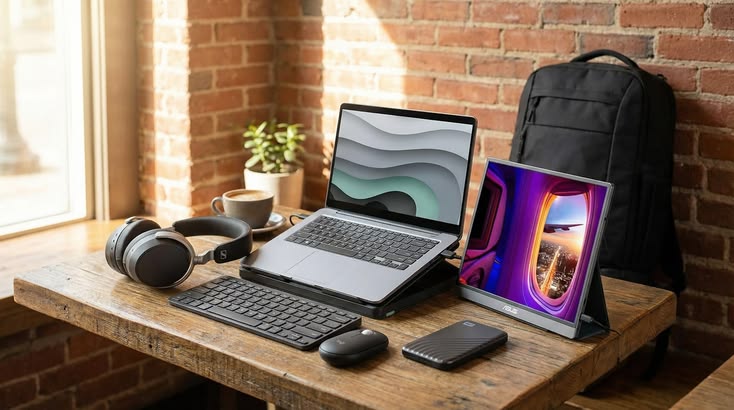
Smaller accessories can improve everyday convenience without requiring a major investment. Depending on your needs, consider a refurbished keyboard, mouse, webcam, or docking station.
- Keyboard and mouse: Useful for extended typing and desktop-style work.
- Webcam and headset: Helpful for meetings, interviews, and online collaboration.
- Docking station: Can simplify connections when using several peripherals.
- External storage: Useful for keeping additional files and backups.
Check compatibility before buying, particularly if your laptop has limited ports or uses a newer connection standard.
How to Keep Your Home Office Budget Under Control
The easiest way to overspend is to buy equipment before deciding what your work actually requires. Make a short list of essential devices, compare refurbished and new prices, and calculate the complete cost, including delivery and any accessories you need.
For example, someone who mainly writes, browses, and attends online meetings may need only a suitable laptop, a mouse, and a headset. A designer or analyst may benefit more from additional memory, a larger monitor, and reliable external storage.
When comparing refurbished home office equipment Spain listings, evaluate the specifications and condition rather than relying on discount percentages alone. A slightly more expensive device with better compatibility and a longer useful life may offer greater value.
What Should You Check Before Ordering?
Before committing to refurbished office electronics, review the product description and seller information. Pay particular attention to the condition grade, battery details, warranty terms, and return policy. Cosmetic condition and technical performance are not the same thing, so do not assume that a device with fewer visible marks necessarily has a healthier battery.
Use this quick checklist:
- Confirm the processor, RAM, storage, and operating-system requirements.
- Check the ports and compatibility with your existing accessories.
- Review battery information and any disclosed faults.
- Verify what is included in the box.
- Compare the final price with a similar new device.
- Read the applicable warranty and return conditions.
Back Market provides product-specific details, but the exact condition, specifications, and available models can vary. Review each listing carefully before checkout.
Is Refurbished Technology Suitable for Remote Work in Spain?
For many remote workers and freelancers across Spain, refurbished technology can be a sensible way to establish a functional workspace. The right setup might support video calls from a home in Madrid, online coursework in Valencia, or freelance projects from a smaller town.
Your internet connection, workspace ergonomics, and software requirements matter just as much as your equipment. A refurbished laptop cannot compensate for an unreliable connection or an uncomfortable chair, so consider the entire working environment when planning your budget.
Frequently Asked Questions
1. Is Back Market es home office tech worth considering?
Yes, it can be worth comparing if you want to reduce upfront costs. Check specifications, condition, warranty coverage, and the price of comparable new equipment.
2. Which refurbished device should I buy first?
Start with a laptop or computer that meets your work requirements. Add a monitor or peripherals only when they solve a specific problem in your workflow.
3. Is refurbished computer equipment reliable?
Reliability depends on the device’s age, condition, refurbishment quality, and maintenance. Review the listing and applicable warranty rather than assuming every refurbished product performs identically.
4. Can refurbished monitors work with modern laptops?
Yes, provided the monitor’s connection and resolution are compatible with your laptop. Check ports, adapters, and cable requirements before purchasing.
5. How can I create a budget home office?
Prioritise essential equipment, compare refurbished and new prices, and account for accessories and delivery. Avoid paying for premium features that do not improve your everyday work.
6. Does refurbished office technology come with a warranty?
Warranty coverage depends on the product and applicable seller terms. Review the current Back Market policy and the details shown for your selected item before ordering.
Ready to plan your workspace? Explore Back Market to compare available refurbished electronics and find technology that fits your tasks and budget.